
Admin panel (`wonkru_mdm_flutter`)
The admin panel is written in Flutter and targets the web. Desktop builds for macOS, Windows and Linux can also be produced. Paths are relative to the wonkru_mdm_flutter/ root.
5.1 Entry points
Section titled “5.1 Entry points”lib/main.dart order:
- The time zone database is loaded (
tzdata.initializeTimeZones()). usePathUrlStrategy(): URLs contain no#(/devices/12).- The Serverpod client is set up (
lib/Data/Client/serverpod_client.dart). DependencyInjection.initCore()registers persistent controllers.- The 401/403 gate is wired up: if any call returns unauthorized,
AuthController.init()runs again. AuthController.init()starts in the background; meanwhile the router waits on the splash screen.
serverpod start launches the panel through lib/driver.dart (see
serverpod.flutter_apps.wonkru_mdm in the server’s pubspec.yaml).
5.2 Server address and session
Section titled “5.2 Server address and session”The address is found by getServerUrl() (serverpod_flutter) in this order:
--dart-define=SERVER_URL=...apiUrlinassets/config.json(in the repohttp://localhost:8090)http://localhost:8080/
When the panel is served from the server’s web port, the server generates the
assets/assets/config.json file at runtime. The compiled panel reads the API address from the server’s
apiServer.publicHost/publicPort setting, so the address does not need to be embedded in the build.
On the web the session is carried by an httpOnly cookie (cookieAuth = kIsWeb, cookie name
wonkru_auth). This has two consequences:
- The panel’s address in the browser must exactly match an entry in the server’s
allowedOriginslist. - In development the panel must run on port 8099. If a random port is chosen, the browser does not send the cookie and login does not work.
On desktop the token is kept in secure storage.
5.3 Architecture
Section titled “5.3 Architecture”lib/ Core/ Constants/ app_sections (menu), breakpoints, Enums/ L10n/ L.dart, L/*_l.dart, Langs/*_tr.dart|*_en.dart Router/ app_router.dart, app_routes.dart Theme/ design.dart (single import), color, spacing, text scale Time/app_time.dart Utils/ APK manifest reader, slugify, file meta… Data/ Client/ serverpod_client.dart, unauthorized_gate.dart Models/ ListQuery, PagedResult… Repositories/ 20 static repositories; each wraps serverpodClient.<endpoint>.<method> Logic/ Controllers/ GetX controllers; lists derive from PagedTableController UI/ InputController, AppToastController Views/ Layout/ AppShell, sidebar, topbar Pages/<Section>/ pages Widgets/<Category>/ shared widgetsThe layer rule is enforced by tests: no file under lib/Views may import Data/Repositories or
Data/Client (test/lint/view_layer_test.dart). The view reaches the server only through a
controller.
- State: GetX (
Rx,Obx,GetxController). - Routing: go_router,
StatefulShellRoute.indexedStack. Each section keeps its own navigation stack. Menu order comes from the list inapp_sections.dartand must match the router branch order verbatim. - DI:
lib/Core/Init/dependency_injection.dart. Auth, theme, language, input, toast and admin notifications are persistent; section controllers uselazyPut(fenix: true). Detail page controllers are created within the page and closed indispose. - Language: GetX Translations,
tr_TRanden_US, fallback language English. Access is typed (L.common.save,L.devices.x). Placeholder syntax is@name+.trParams(...). Language is selected from the topbar and persisted. - Theme: light/dark/system and UI scale (0.9 to 1.25), in localStorage in the browser.
- Time: all times are converted to the panel time zone on the server with
AppTime. If the time zone is not configured, UTC is shown and a non-dismissible warning strip appears.
List infrastructure
Section titled “List infrastructure”List pages are built with PagedTableController<T> (Logic/Controllers/Base/paged_table_controller.dart)
and AppDataTable<T> (Views/Widgets/Table/app_data_table.dart, on top of Syncfusion DataGrid):
- The controller keeps the page 0-based, and
apiPage = page + 1is sent to the server. The request is produced withquery.toAdminListRequest(). - Late-arriving stale responses are discarded with a request token.
- Helpers:
setSearch,setSort,setFilter,reloadAfter(...),applyToSelected(...),deleteSelectedEach(...). - Table: search (300 ms debounce), refresh, column show/hide, server-side sorting
(only columns with
sortKey), page size 10/25/50/100, selection and bulk actions, row menu, empty/error/skeleton states. - Lookup lists (policy, group selectors) are not paginated; they fetch at most 200 records.
- CSV export is generated on the server and contains all rows matching the filter, not just the ones on the page.
Other shared parts: runAction / confirmAndRun (success/error toast in one place),
openLinkOrCopy / openDownload, AppDialogShell, RemoteSearchList,
showAssignGroupsDialog, TextControllersOwner, AppFileUpload, ExportButton.
5.4 Login, 2FA and first-time setup
Section titled “5.4 Login, 2FA and first-time setup”AuthStatus: loading, signedOut, awaitingTwoFactor, noAccess, ready, failed.
- First launch: if there is no admin in the system,
adminAuth.me()returnsneedsBootstrap: trueand the login screen asks for an email and password to create the first admin. When the account is ready, sign in with those details. - Login:
adminAuth.login(because it goes through the server, an audit record is written). There is no sign-up screen; new admins are added from the Users page. - 2FA: on an account with 2FA enabled, a code step follows login. Either a TOTP code or a recovery code is accepted. Verification is valid for 12 hours per session; when it expires the panel automatically returns to the code step through the 401/403 gate.
- noAccess: the account is inactive or the token has no
adminscope. Because the scope is written into the token at login, a logout/login is required after a permission change. - After login you are returned to the protected deep link via
?from=; only panel-relative paths are accepted.
5.5 Pages
Section titled “5.5 Pages”In sidebar order. When the width drops below 1024 px the sidebar turns into a drawer.
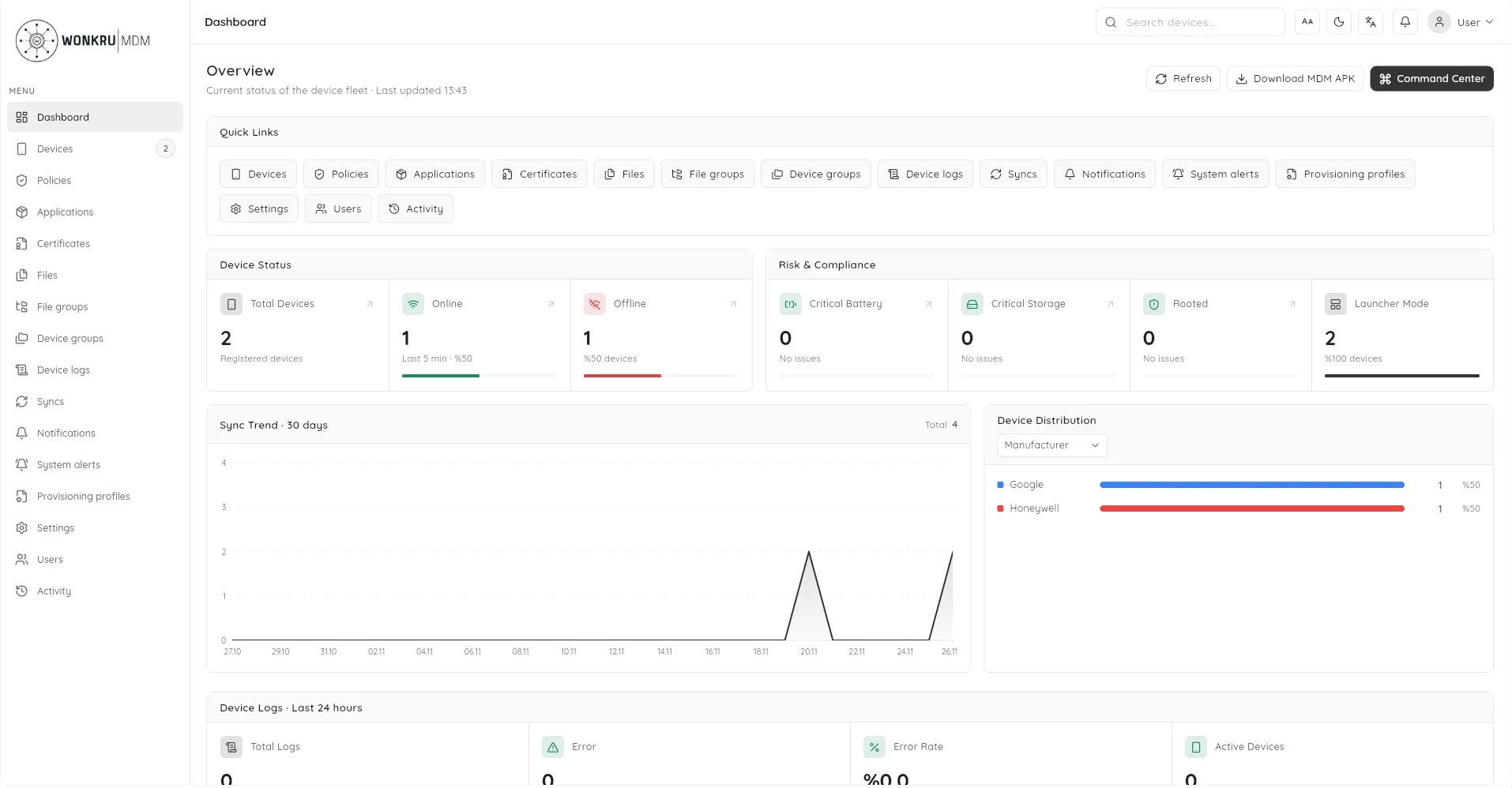
Dashboard (/dashboard)
Section titled “Dashboard (/dashboard)”- Device status: total, online, offline (online threshold is
offline_timeoutin settings). - Risk: critical battery (<20%), critical storage (<10% free), root, launcher mode.
- Logs (24 hours): total, ERROR+FATAL, error rate, number of devices sending logs.
- Charts: sync trend (30 days), device distribution (manufacturer/model/Android), log trend and level distribution (24 hours / 7 days / 30 days).
- Clicking cards opens the device list with the relevant filter.
- “Command Center” button.
- Loads only on first open; after that use “Refresh”.
Devices (/devices)
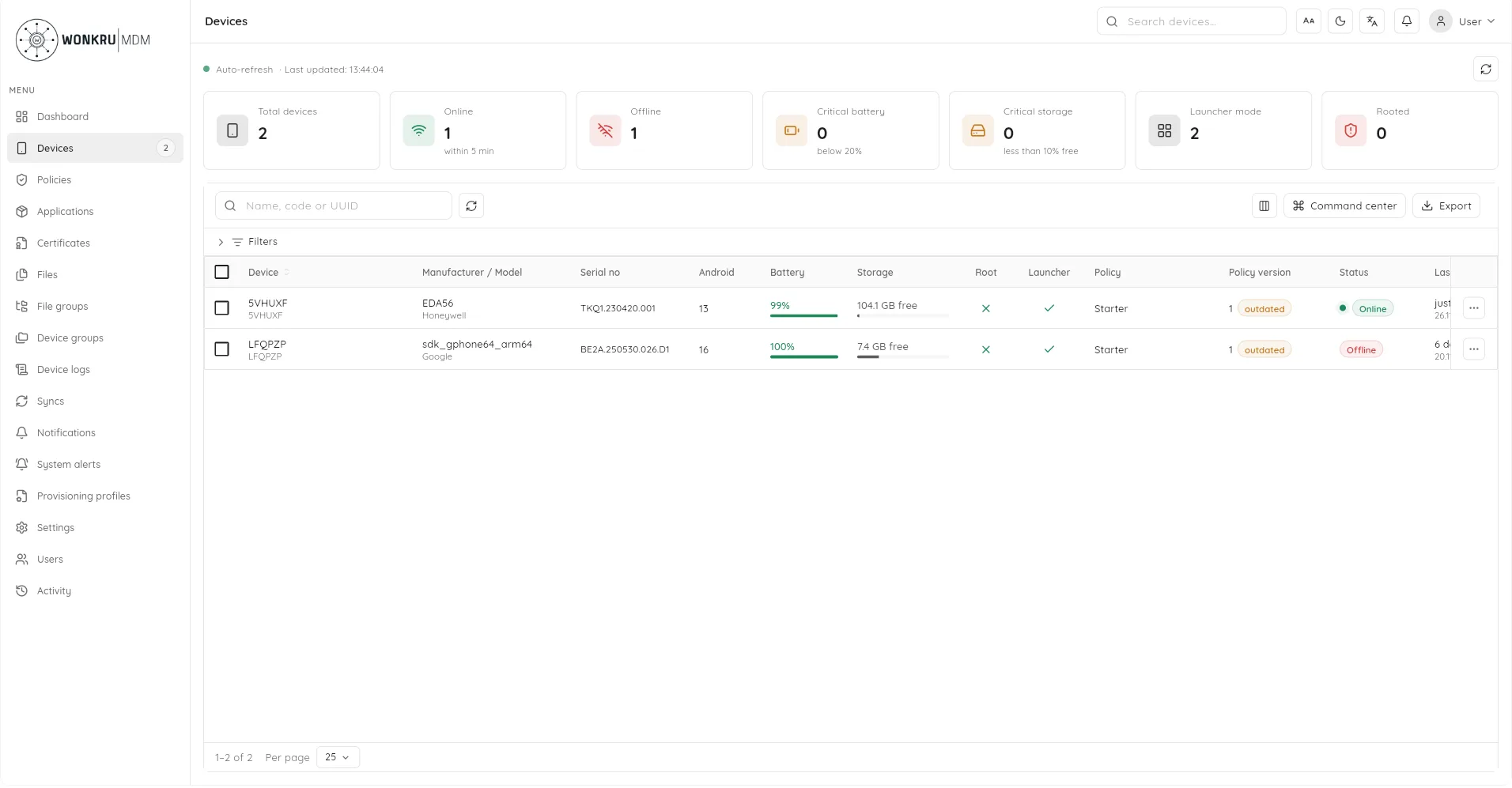
Section titled “Devices (/devices)”- Columns: device, manufacturer/model, serial no, Android, battery, storage, root, launcher, policy, policy version (“not up to date” badge), agent version, IP, status, last seen.
- Filters: policy, group, online/offline, root, manufacturer, Android version, critical battery, critical storage, not seen for 24 hours, no policy.
- Bulk actions: assign policy, assign group, send policy update, delete, CSV.
- The topbar search box (Enter) opens this list with the search.
Command Center (Views/Pages/Devices/device_command_dialog.dart): you choose an action,
fill in its parameters (there is an app picker for the package name), and select target devices.
For single-device actions (launch_app, uninstall_app, get_installed_apps,
get_logs, device_data, get_current_location) the target is reduced to a single device.
lock_device, clear_app_data and uninstall_app require confirmation. After sending, status is polled every
2 seconds; it stops when no pending command remains.
Device detail (/devices/:id)
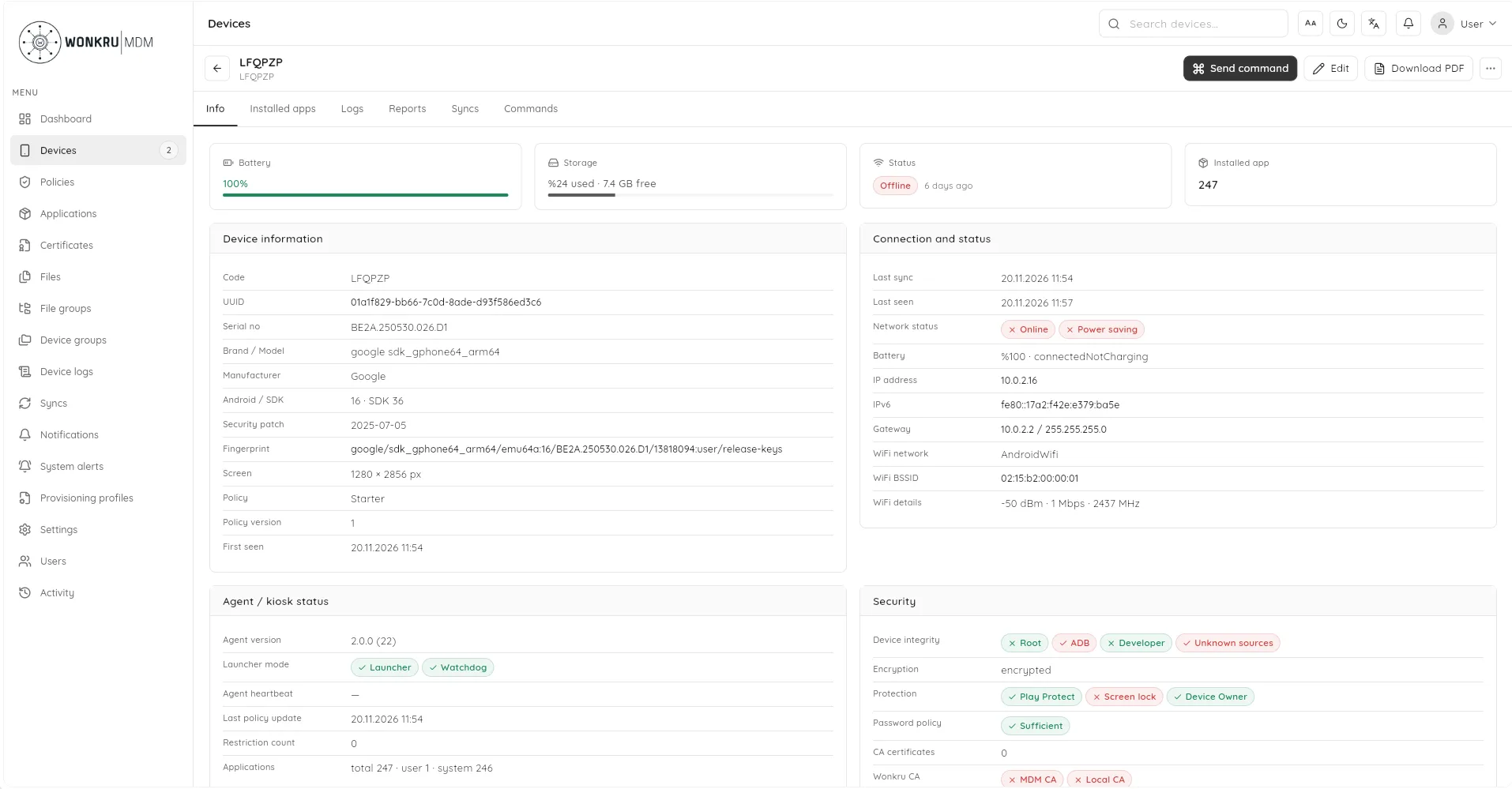
Section titled “Device detail (/devices/:id)”Top menu: send command, edit (name, code, policy, user, required apps, groups), PDF report (TR/EN), send policy update, “own policy” (copies the device’s policy and assigns it only to that device), delete.
Tabs:
- Info: summary strip, device, connection, agent, security cards, groups.
- Installed apps: the list is searched/sorted on the client. Row commands to launch, open settings,
uninstall. If the list is not up to date,
get_installed_appsis sent from the Command Center. - Logs: the device’s logs; click a row for detail.
- Reports: battery and free storage trend, latest reports.
- Syncs: the device’s sync history.
- Commands: sent commands, status and response. If the response has
latitude/longitude, a Google Maps link appears. That is the extent of the location feature; there is no separate location tab or continuous location tracking.
Policies (/policies) and policy editor
Section titled “Policies (/policies) and policy editor”List: name, slug, version, default, active, updated. Row menu: edit, copy, preview (the JSON that will go to the device), send to devices, make default, delete.
Editor tabs (for a new policy only General is visible; for the others you must save first):
| Tab | Content |
|---|---|
| General | Name, slug (auto from name), description, the admin password of the on-device IT page (required for a new policy; if left blank when editing it is preserved), active, default, active time ranges, sync cron and maximum sync interval |
| Battery / Storage | Alert thresholds |
| Sound | Fixed volume or min/max range |
| Screen | Lock screen message, screenshot ban, timeout, brightness, rotation |
| Security | Password policy, keyguard biometric disables, allowed accessibility apps |
| Restrictions | Android user restrictions coming from the catalog on the server, grouped |
| Launcher | Launcher mode, grid/list, columns, background (color or uploaded image), icon, colors, header widgets |
| Other | Bluetooth/camera/physical media shortcuts, automatic time/time zone, required Wi-Fi |
| Applications | Apps tied to the policy: target version, install/remove/configure, show in launcher and its position, run on boot, launch after install, ordering |
| Files | Download / open / delete operations, destination path, overwrite, open on download |
| Certificates | Install / remove |
Tri-state fields: active, inactive, default (left untouched on the device).
If the restriction catalog cannot be reached, the save does not overwrite restriction_settings; it
gives a warning.
Applications (/applications) and versions (/applications/:id/versions)
Section titled “Applications (/applications) and versions (/applications/:id/versions)”- “New application”: an APK is chosen; the panel reads the APK manifest in the browser and fills in the package name, name, versionCode/Name, min/target SDK and permissions. After saving, the versions page opens.
- If the same package already exists, after confirmation it is added to the existing application as a new version; if the versionCode collides, a warning is given.
- Versions page: APK upload, active/default flags, permission actions (allow/ask/deny).
Certificates (/certificates)
Section titled “Certificates (/certificates)”File upload or pasting PEM; password for PKCS#12. “Fetch info” parses the type, serial no, fingerprint and validity dates on the server and fills them in. Download uses a 10-minute signed link.
Files (/files) and file groups (/file-groups)
Section titled “Files (/files) and file groups (/file-groups)”When uploading a file a disk is chosen: private (only via signed link) or public. Files
can be assigned to groups. On the group page, members are selected from a server-searchable list.
Device groups (/device-groups)
Section titled “Device groups (/device-groups)”Name and description. A group does not carry a policy; it is for filtering and bulk selection. Clicking the device count opens the device list with that group.
Device logs (/device-logs)
Section titled “Device logs (/device-logs)”Level (0 VERBOSE … 5 FATAL), device, tag, session, stacktrace present/absent, period and date filters; summary, distribution, trend; CSV.
Agent logs are not sent to the server by default (wlog_remote_enabled off). While off,
logs arrive only via the get_logs command. You can enable them from Settings > WLog.
Syncs (/device-syncs, /device-syncs/:id)
Section titled “Syncs (/device-syncs, /device-syncs/:id)”Full telemetry records sent by the agent. In the detail, section-by-section raw data and installed apps.
Notifications (/notifications)
Section titled “Notifications (/notifications)”Sending notifications to devices (title, message, target devices, extra fields) and delivery status (sent / received / pending / failed).
System alerts (/admin-notifications)
Section titled “System alerts (/admin-notifications)”Alarms produced by the server: device_offline, policy_update_pending, security_info.
The unread count appears in the sidebar and the topbar bell; it refreshes every 60 seconds and on every section
change.
Provisioning profiles (/provisioning-profiles)
Section titled “Provisioning profiles (/provisioning-profiles)”The editor keeps its form and raw JSON in sync. The default Wonkru MDM profile and Load default template use the catalog APK, its SHA-256 checksum and the server’s API address. Enter the setup Wi-Fi network name and the credentials required by its security type to save the profile and generate its QR code.
The server adds the current enrollment key when you open a profile. Preview the QR in the editor, open it full-screen or download it as a PNG. Device enrollment
Settings (/settings)
Section titled “Settings (/settings)”| Section | Content |
|---|---|
| General | Default policy, MDM APK package name, email brand name, panel time zone, offline timeout, offline alert threshold and policy update check delay |
| Upload limits | APK, file, certificate, launcher background (MB), device upload (KB). Cannot exceed the server ceiling |
| Alerts | Repeat prevention duration, channel per alert type (database, mail) |
| WLog | Agent log levels, local buffer, remote sending |
| SMTP | Server, port, user, password, encryption, sender. A test mail can be sent without saving |
| Device enrollment key | Show, copy, show as QR, rotate. Rotating it means old QRs cannot enroll new devices; enrolled devices are unaffected |
Use the theme button in the top bar to change the panel appearance.
Users (/users)
Section titled “Users (/users)”Admin accounts: name, email, password, blocked. There is no role/permission distinction; every active user is a full admin. You cannot delete your own account.
Activity (/activity)
Section titled “Activity (/activity)”Read-only audit log: time, actor, action, target, IP. Actor, action and date filters.
Profile (/profile, from the user menu)
Section titled “Profile (/profile, from the user menu)”- Change password (at least 6 characters) and change email. Both require the current password and, if 2FA is on, the code.
- 2FA setup: QR (or manual secret) → code verification → the 10 recovery codes are shown only at this step. Disabling 2FA requires a code.
5.6 Build
Section titled “5.6 Build”Development:
cd wonkru_mdm_server && serverpod startTo run the panel on its own (the port must be fixed):
cd wonkru_mdm_flutter && flutter run -d chrome --web-port=8099The web production build is written to the server’s web/app folder and served from there:
cd wonkru_mdm_server && serverpod run flutter_buildThis script runs flutter build web --wasm --base-href / --output ../wonkru_mdm_server/web/app.
For desktop, the standard flutter build macos|windows|linux is used; the server
address is given with --dart-define=SERVER_URL=....
If the panel is published from another static server, path-based URLs mean all paths
must fall back to index.html, assets/config.json must contain the correct API address, and the origin must be in allowedOrigins.